Data format
As we saw in the previous tutorial, we need our data to be formatted as a JSON or CSV file, to train our model. The exact formatting of the data depends both on the nature of the data, as well as how you expect or want the model to behave. To use the same case-scenario across different types of formatting, let's continue with MIDI data as an example, where we can understand MIDI events as a 2D matrix or table with each event as a row and each feature as a column:
| time | pitch | velocity | duration | channel |
|---|---|---|---|---|
| 0.0 | 60 | 80 | 0.25 | 1 |
| 0.25 | 64 | 75 | 0.25 | 1 |
| 0.5 | 67 | 85 | 0.25 | 2 |
| 1.0 | 64 | 70 | 0.25 | 2 |
| 2.0 | 60 | 90 | 0.5 | 1 |
This table represents the following:
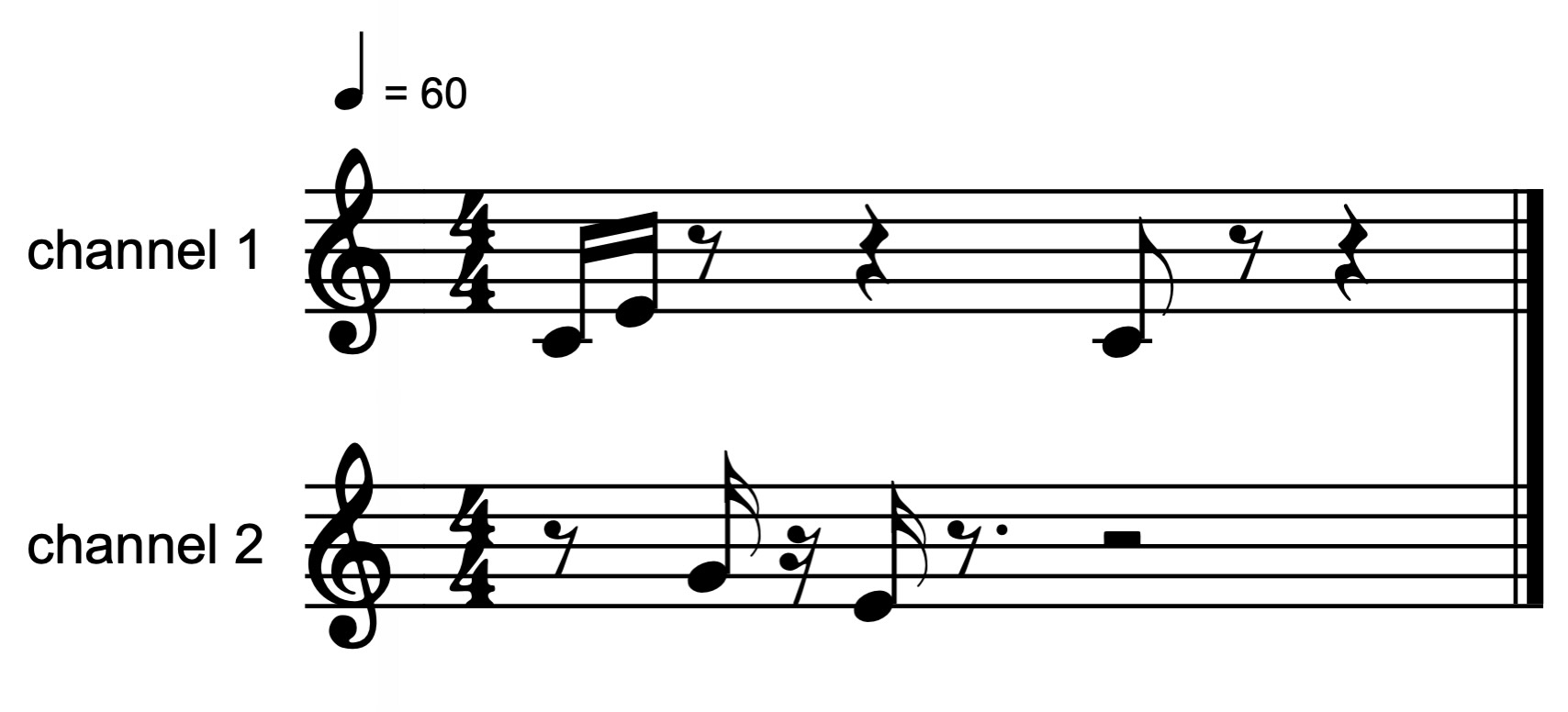
To keep things simple, we'll stick to this very simple sequence of 5 MIDI notes.
Temporality
Atemporal data
If the timing of each note event didn't matter, but only the order did, we could specify the data without any timing information.
- json
- csv
{
    "data": [
        [60, 80, 0.25, 1],
        [64, 75, 0.25, 1],
        [67, 85, 0.25, 2],
        [64, 70, 0.25, 2],
        [60, 90, 0.5, 1]
    ]
}
f0,f1,f2,f3
60,80,0.25,1
64,75,0.25,1
67,85,0.25,2
64,70,0.25,2
60,90,0.5,1
Note that all events must have the same number of elements—i.e., the sequence must be represented as a 2D rectangular matrix—each column being a feature, and each row a step in the sequence.
Temporal data
However, with MIDI data, we most certainly want the model to also learn the timing of each step, so we provide timestamps for each event in the sequence, in seconds. In other words, cases in which not only the order of events matters, but also when they happen.
- json
- csv
{
    "time": [0.0, 0.25, 0.5, 1.0, 2.0],
    "data": [
        [60, 80, 0.25,1],
        [64, 75, 0.25,1],
        [67, 85, 0.25,2],
        [64, 70, 0.25,2],
        [60, 90, 0.5,1]
    ]
}
time,f0,f1,f2,f3
0.0,60,80,0.25,1
0.25,64,75,0.25,1
0.5,67,85,0.25,2
1.0,64,70,0.25,2
2.0,60,90,0.5,1
Why does hachi machi consider time as separate from other any features? This is because models trained on temporal vs. non-temporal data will behave differently during streaming mode (i.e., via the run command). If the data is atemporal, the prediction will be emitted immediately, while for temporal models, the prediction is scheduled to be emitted at some time in the future based on what the model learned.
Note that time values must specified in seconds and, for CSV data to be recognized as temporal by hachi machi, it must be the first column and have time as the column name.
Feature types
Continuous
By default, all features are treated as continuous—that is, they can take any numeric value within some unspecified range (e.g., pitch, amplitude, duration).
Categorical

Features can also be declared categorical, which is appropriate for discrete identifiers such as MIDI channels or ON/OFF states. Doing so improves model training by changing how those features are encoded internally.
- json
- csv
{
    "time": [0.0, 0.25, 0.5, 1.0, 2.0],
    "features": {
        "3": { "categorical": true }
    },
    "data": [
        [60, 80, 0.25, 1],
        [64, 75, 0.25, 1],
        [67, 85, 0.25, 2],
        [64, 70, 0.25, 2],
        [60, 90, 0.5, 1]
    ]
}
time,f0,f1,f2,f3#
0.0,60,80,1
0.25,64,75,1
0.5,67,85,2
1.0,64,70,2
2.0,60,90,1
In this example, the fourth feature—i.e., the MIDI channel—in each event (index 3) will be treated as categorical. Any feature not marked as categorical is assumed to be continuous.
Note the difference in syntax for each file format. In CSV, a categorical feature specified by appending a # to the feature's column name. In JSON, an additional "features" key is added and the categorical, and "categorical" is set to true for that feature.
Categorical values not present in the data won't be recognized by the model during inference, and will lead to errors.
Masked features

During real-time interaction, we will often want (or need) the model to predict features we can't realistically know at the moment we want to predict the next event. In the case of our MIDI data, a very obvious example of this is not knowing how long the current note will be at the moment it starts. The desired behavior can be represented as follows:
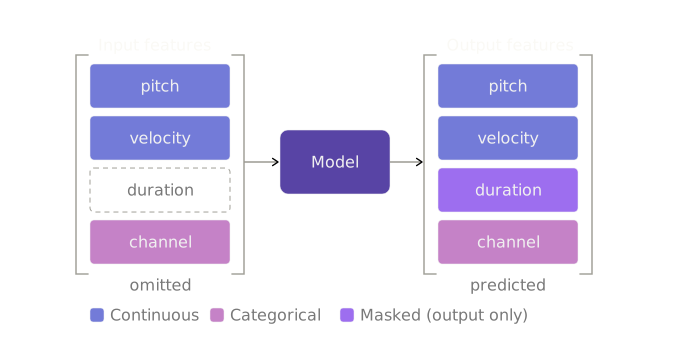
We refer to this behavior as feature masking, meaning we tell the model that the feature should be output only. This way the model can predict what that feature will be in the next event, without knowing what it currently is. Here's how masked features are specified in our data:
- json
- csv
{
    "features": {
        "2": { "categorical": true },
        "3": { "masked": true }
    },
    "time": [0.0, 0.25, 0.5, 1.0, 2.0],
    "data": [
        [60, 80, 1, 0.25],
        [64, 75, 1, 0.25],
        [67, 85, 2, 0.25],
        [64, 70, 2, 0.25],
        [60, 90, 1, 0.5]
    ]
}
time,f0,f1,~f2,f3#
0.0,60,80,0.25,1
0.25,64,75,0.25,1
0.5,67,85,0.25,2
1.0,64,70,0.25,2
2.0,60,90,0.5,1
Note the difference in syntax for each file format. In CSV, a masked feature specified by prepending a ~ to the feature's column name, while in JSON we set masked to true for that feature.